Changelog
All new releases and improvements to Spike
The new Slack app for Spike
We rebuilt the Slack app from the ground up. The headline is Spike AI: mention @Spike in any thread and run your incident response in plain language. Plus a leaner alert layout and richer link previews.
If your workspace is already connected, you need to reconnect. The new app adds Slack scopes, and reconnecting is how you pick them up. Head to the Slack connect page → to do it in a few clicks.
Here is everything new in the new app for Slack.
Spike AI, in any thread
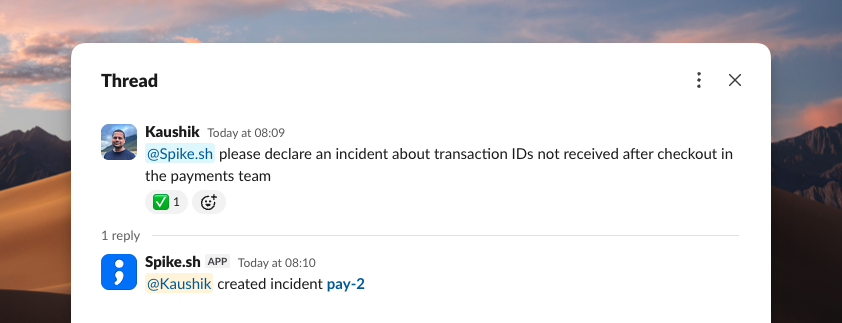
This is the big one. Mention @Spike in any Slack thread and get things done in plain language. No slash commands, no syntax to memorize. It reads the thread and acts on it.
- Declare an incident, or turn an existing thread into one.
- Add or remove responders on the fly.
- Add overrides when plans change.
- Check who is on call and list open incidents.
- Ask questions about your account and get an answer in the thread.
Spike AI turns any conversation into the place you run the incident from.
Incident alerts
Handle an incident without leaving the alert. Acknowledge, resolve, add a note, or spin up an incident channel right from the message. The layout is leaner, so the actions you reach for are front and center.
- Fetch the activity log to see what happened and when.
- Open the full incident payload inside Slack.
- Create a Statuspage incident and link it back to the alert.
We also shipped a new template for incident alerts, so every alert reads clearly at a glance.
On-call alerts
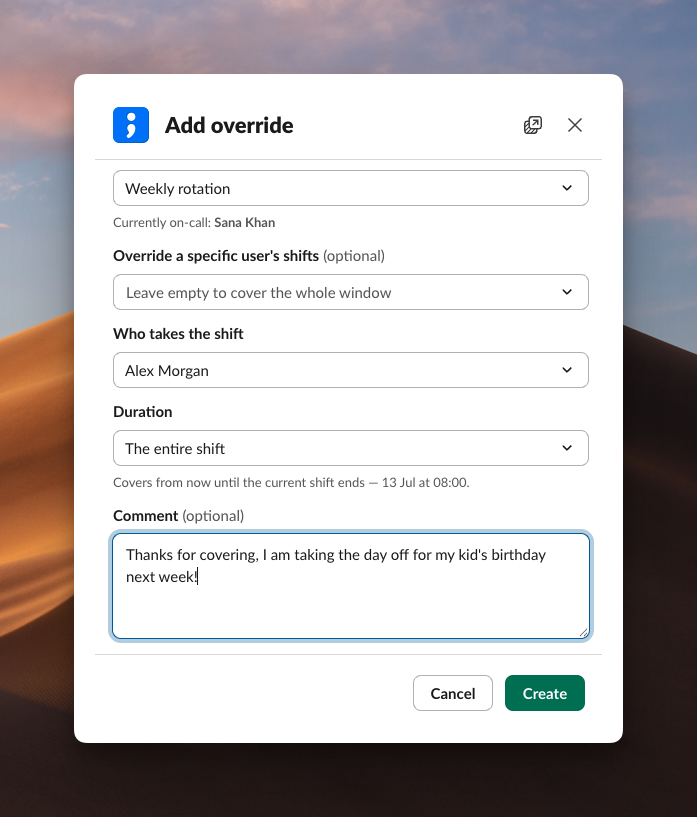
Add an override straight from the on-call alert. If you cannot take a shift, hand it off in a click without opening the dashboard.
Link unfurling
Paste an incident link and Slack expands it into a rich preview. Everyone in the channel gets the context without clicking through.
You can change incident details from the preview too, so a link becomes a place to act, not just a reference.